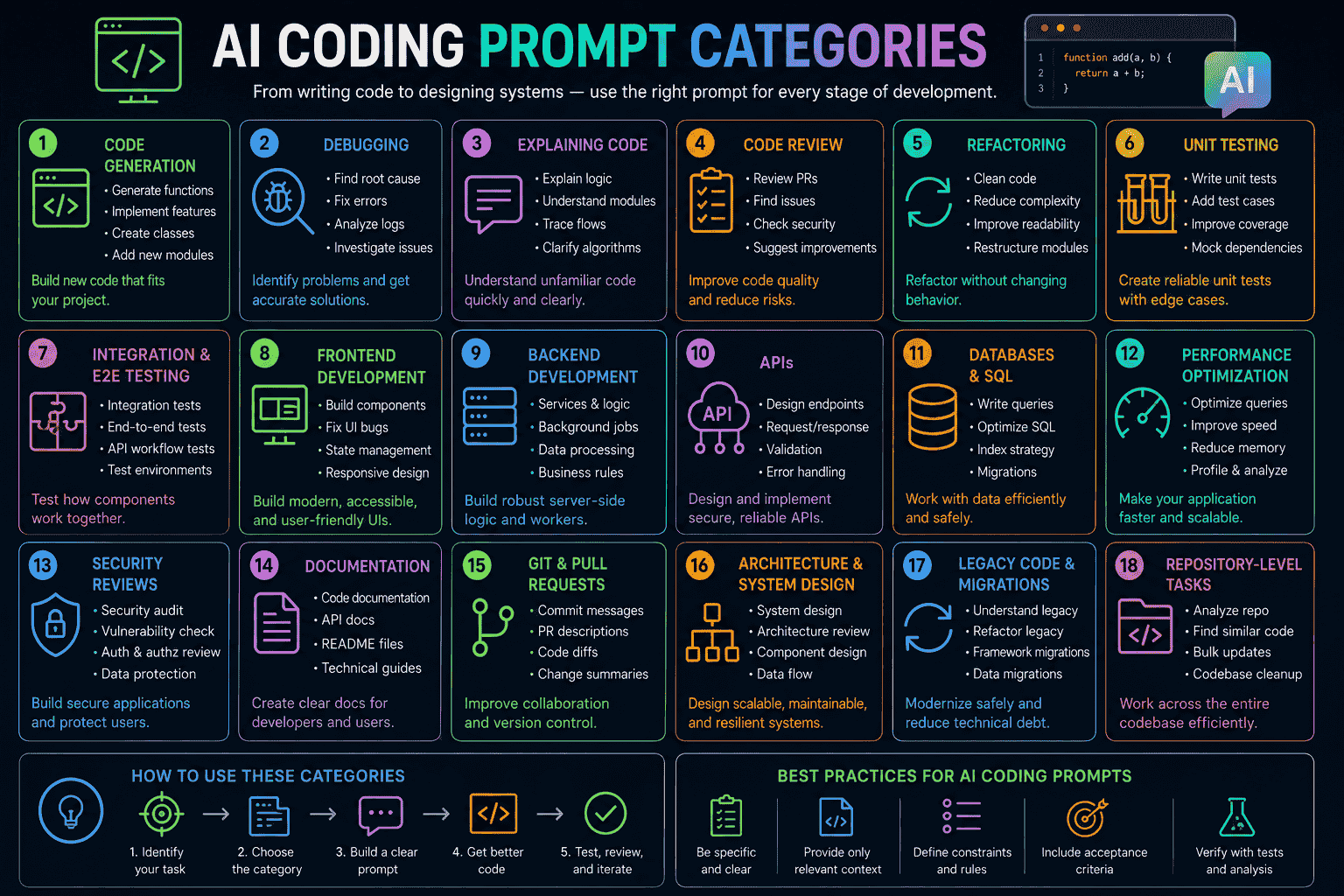
AI assistants can now support many stages of software development and engineering, but the quality of their output depends heavily on the quality of the instructions and context they receive.
A short request such as “write this function” can work for a small task, while a production codebase usually requires considerably more context.
This guide explains how to create practical AI prompts for coding and engineering. The same principles apply to AI coding prompts, debugging, code review, testing, architecture, databases, DevOps, mobile development, and technical engineering disciplines.
AI-generated output should be treated as an implementation aid rather than an automatic source of truth. Developers should inspect generated code, run appropriate tests, review dependencies and security implications, and validate behavior against the actual requirements.
What Are AI Prompts for Coding?
AI prompts for coding are structured instructions that tell an AI assistant what you are building, what technologies you are using, what constraints matter, and what output you expect.
They can help developers generate functions, explain unfamiliar code, diagnose errors, create tests, design APIs, document systems, or explore architecture options.
Instead of asking “fix my API,” provide the endpoint, framework, error response, expected behavior, relevant code, runtime environment, and acceptance criteria.
| Task | Useful AI Role | Required Context | Human Verification |
|---|---|---|---|
| Coding | Implementation assistant | Inputs, outputs, stack | Tests and review |
| Debugging | Diagnostic assistant | Error, code, reproduction | Reproduce and test |
| Testing | Test designer | Behavior and edge cases | Run tests |
| Architecture | Design facilitator | Scale, constraints, dependencies | Engineering review |
| Security | Review assistant | Threat model and code | Security validation |
| Documentation | Technical writer | Interfaces and behavior | Accuracy review |
| DevOps | Configuration assistant | Runtime and deployment model | Dry run and deployment checks |
| Engineering Design | Analysis assistant | Inputs, assumptions, standards | Qualified professional review |
Anatomy of a High-Quality Technical Prompt
A strong prompt usually answers seven questions: Who should the AI act as? What is the goal? What context does it need? What constraints apply? What should it produce? How will the result be tested? What makes the result acceptable?
- Role: establishes the relevant technical perspective.
- Goal: defines the actual outcome.
- Context: supplies architecture, existing code, users, and dependencies.
- Constraints: prevents unwanted technologies or behavior.
- Expected output: defines the response format.
- Testing: asks for verification instead of implementation alone.
- Validation criteria: provides a concrete definition of success.
Master AI Coding Prompt Framework
Use this reusable structure when a task is complex or the first AI response is too generic:
ROLE:
Act as a senior software engineer experienced in the specified stack.
GOAL:
Describe the exact result that must be achieved.
PROJECT CONTEXT:
Explain the application, existing architecture, relevant modules, users, and dependencies.
TECH STACK:
Language, framework, runtime, database, libraries, hosting, and versions where relevant.
INPUT:
Provide the relevant code, data, API contract, logs, or requirements.
REQUIREMENTS:
List functional and non-functional requirements.
CONSTRAINTS:
State compatibility, library, performance, design, or architectural constraints.
EDGE CASES:
List invalid input, failure, concurrency, timeout, empty-state, and boundary scenarios.
SECURITY REQUIREMENTS:
State authentication, authorization, validation, secrets, privacy, and threat considerations.
PERFORMANCE REQUIREMENTS:
Define latency, memory, throughput, query, or resource expectations where applicable.
EXPECTED OUTPUT:
Specify exactly what should be returned: code, patch, explanation, tests, files, or structured data.
TESTING REQUIREMENTS:
Request relevant unit, integration, regression, or end-to-end tests.
VALIDATION CRITERIA:
Define how the result will be checked and what conditions must pass.
Each component reduces ambiguity. Context tells the model what already exists; constraints prevent incompatible solutions; edge cases expose failure paths; and validation criteria turn a vague request into a testable engineering task.
AI Prompts for Software Development
Developers can use AI for implementation drafts, boilerplate, algorithms, UI components, configuration, documentation, and code explanation. For more ready-to-use examples, explore AI Prompts for Coding.
Act as a senior TypeScript developer. Create a function that validates an email address and returns a typed result containing either a valid address or a specific validation error. Avoid external dependencies. Include edge cases and unit tests.AI Prompts for Debugging
Good AI debugging prompts include the exact error, expected behavior, actual behavior, environment, relevant code, reproduction steps, and recent changes.
Analyze this error as a debugging assistant. First identify the most likely root cause, then list alternative causes. Explain the evidence for each. Propose the smallest safe fix and provide a regression test. Do not change unrelated code.
Error:
[paste error]
Expected:
[expected behavior]
Actual:
[actual behavior]
Relevant code:
[paste focused code]
AI Prompts for Code Review
Review the following pull request as a senior engineer. Check correctness, security, error handling, maintainability, performance, race conditions, API compatibility, and test coverage. Separate confirmed issues from suggestions. For every issue, cite the relevant code and explain a practical fix.AI Prompts for Testing
Create unit and integration tests for this module. Cover normal cases, invalid input, empty values, boundaries, exceptions, retries, concurrency where relevant, and regression scenarios. Use the existing testing framework and do not mock behavior that should be tested for real.AI Prompts for Refactoring
Refactor this legacy module without changing its public behavior. Identify code smells first. Preserve API compatibility, improve readability and testability, minimize the diff, and explain each meaningful change. Add regression tests for behavior that must remain unchanged.AI Prompts for API Development
Design a REST API for [resource]. Use [framework]. Define endpoints, request and response schemas, validation, authentication, authorization, pagination, error responses, idempotency where needed, rate limiting, logging, and tests. Return the design before implementation code.AI Prompts for Database Engineering
Design a normalized database schema for [application]. Identify entities, relationships, primary keys, foreign keys, indexes, constraints, common queries, transaction boundaries, and migration considerations. Explain important tradeoffs and provide SQL for the selected design.AI Prompts for Chat and Real-Time Applications
Real-time applications need more than a message input and a WebSocket connection. Developers should consider authentication, authorization, Socket.IO or WebSocket events, presence, reconnect behavior, message persistence, rate limiting, moderation, ordering, delivery failures, and backend scalability.
Act as a senior real-time systems architect. Design a scalable chat platform using Node.js, Express, Socket.IO, WebRTC where peer media is required, and a persistent database.
Cover:
- authentication and authorization
- connection lifecycle
- presence indicators
- reconnect and missed-message handling
- message persistence and ordering
- rate limiting and abuse prevention
- moderation hooks
- WebRTC signaling
- horizontal scaling
- Socket.IO adapter requirements
- observability
- failure scenarios
Provide a component diagram in text, event contracts, data flow, API boundaries, security risks, and a phased implementation plan. Identify decisions that require load testing before production.
AI Prompts for Mobile App Development
Mobile projects benefit from prompts that specify the platform, navigation model, state management, permissions, offline behavior, accessibility, API integration, and release requirements. See these Mobile App Development Prompts for additional prompt ideas.
Design a mobile app for [use case] using [framework]. Define navigation, state management, API integration, offline behavior, loading and error states, accessibility, permissions, secure local storage, and testing strategy. Keep the first implementation modular and explain platform-specific considerations.AI Prompts for DevOps and CI/CD
Create a CI/CD pipeline for this application using [platform]. Include dependency installation, linting, unit tests, build validation, artifact handling, security checks, environment variables, deployment gates, rollback strategy, and caching. Never place secrets directly in the configuration. Explain each stage.AI Prompts for Mechanical Engineering
AI can help organize requirements, compare design concepts, prepare documentation, explore failure modes, and explain engineering principles. Mechanical work may involve physical safety and regulatory requirements, so generated calculations and designs must be independently checked by qualified professionals.
For prompt ideas focused on mechanical workflows, see Mechanical Engineering Prompts.
Civil Engineering & Architecture
AI can help structure site requirements, design alternatives, material comparisons, documentation, BIM-related workflows, and project checklists. Explore Civil & Architectural Design Prompts.
Electrical Engineering
AI can assist with documentation, requirements analysis, circuit explanations, test planning, and design-review checklists. For additional examples, see Electrical Engineering AI Prompts.
VLSI & Hardware
Prompts can help structure RTL reviews, verification plans, interface documentation, synthesis considerations, and hardware design questions. Explore VLSI & Hardware Design for specialized examples.
Robotics & Mechatronics
Robotics prompts can cover system decomposition, sensor interfaces, control logic, simulation plans, state machines, fault handling, and documentation. See Robotics & Mechatronics AI Prompts.
Engineering Safety Reminder
For safety-critical engineering, AI output must not replace qualified professional review, engineering calculations, applicable standards, physical testing, certification, or regulatory requirements. Treat AI output as assistance that requires independent validation.
Security and Privacy Rules
Never paste secrets into an AI prompt
- API keys and access tokens
- Passwords and authentication secrets
- Private certificates or private keys
- Database credentials
- Private customer or user information
- Confidential source code unless your organization permits the workflow
Use placeholders such as
YOUR_API_KEY, DATABASE_URL, or
REDACTED_USER_DATA. Keep private values in secure
environment variables or approved secret-management systems.
Common AI Prompt Mistakes
Define the exact task, inputs, outputs, and constraints.
Provide relevant architecture, code, environment, and behavior.
Isolate the smallest relevant module and explain its role.
State compatibility, library, performance, and architecture constraints.
Describe how success will be verified.
Request appropriate unit, integration, regression, or scenario tests.
Review, run, test, and inspect every important change.
Redact secrets and use safe placeholders.
Advanced Prompt Engineering Techniques
- Role prompting: ask for the perspective relevant to the task.
- Context engineering: provide the right project information rather than simply more information.
- Decomposition: split architecture, implementation, testing, and review into stages.
- Iterative prompting: use the first response to identify missing requirements and refine the next request.
- Test-first prompting: ask for tests or acceptance criteria before implementation.
- Constraint-based prompting: explicitly restrict libraries, APIs, runtime versions, or architectural changes.
- Structured output: request tables, JSON, patches, checklists, or defined sections when useful.
- Critique-and-revise: ask the assistant to identify weaknesses in a proposed solution before revising it.
- Repository-aware prompting: reference actual module names, interfaces, conventions, and dependency boundaries.
- Example-driven prompting: provide representative input/output pairs when behavior is difficult to describe.
- Edge-case prompting: explicitly request boundary, failure, concurrency, timeout, and malformed-input scenarios.
Developer AI Workflow
- Define: write the desired behavior and acceptance criteria.
- Contextualize: provide the relevant stack, interfaces, files, and constraints.
- Generate: ask for a focused implementation or design.
- Inspect: review assumptions, dependencies, security, and compatibility.
- Test: run automated and manual checks.
- Refine: give concrete failures back to the assistant.
- Document: capture important decisions and usage instructions.
- Integrate: merge only after the normal engineering review process.
This workflow keeps AI-assisted development inside an engineering feedback loop instead of treating the assistant's first response as the final implementation.
Practical Prompt Examples
Generate a Function
Act as a senior TypeScript developer. Create a function that validates an email address and returns a typed result containing either a valid address or a specific validation error. Avoid external dependencies. Include edge cases and unit tests.Optimize Performance
Profile this code conceptually and identify likely CPU, memory, I/O, and database bottlenecks. Rank the proposed optimizations by expected impact and implementation risk. Preserve behavior and suggest benchmarks to validate improvements.Security Review
Review this code for authentication, authorization, injection, insecure data handling, secrets exposure, unsafe deserialization, dependency risks, and logging of sensitive data. Separate confirmed risks from hardening suggestions and explain how to validate each fix.API Documentation
Generate developer documentation for this REST API. Include authentication, endpoints, parameters, request examples, response examples, errors, status codes, pagination, rate limits, and common integration mistakes. Do not invent undocumented behavior.Architecture Review
Review this application architecture for scalability, reliability, security, maintainability, and operational complexity. Identify assumptions and bottlenecks, explain tradeoffs, and propose alternatives without changing requirements that were not requested.Find Edge Cases
Analyze this function and produce a table of edge cases covering empty input, null values, boundaries, malformed data, duplicate requests, concurrency, timeouts, retries, large inputs, and dependency failures. For each case, state expected behavior and a suggested test.Technical Documentation
Turn these implementation notes into concise technical documentation for developers. Preserve factual behavior, explain architecture and setup, document configuration, list assumptions, and clearly distinguish required steps from optional recommendations.WebSocket Chat System
Design a WebSocket chat system with authenticated users, rooms, message persistence, presence, typing indicators, reconnect handling, rate limiting, moderation, and horizontal scaling. Define events, payloads, failure handling, database responsibilities, and security controls. Include tests for disconnects, duplicate messages, unauthorized room access, and reconnects.Mobile Application
Build an implementation plan for a cross-platform mobile app that consumes a REST API. Cover navigation, state management, authentication, secure token storage, offline states, retries, loading states, accessibility, API errors, testing, and release configuration. Identify platform-specific risks before suggesting code.CI/CD Configuration
Create a CI/CD configuration for a Node.js application. Run linting, tests, dependency checks, build validation, and deployment only after required checks pass. Use secret variables instead of hard-coded credentials and include a rollback strategy.Frequently Asked Questions
Final Takeaway
Effective AI-assisted development is less about finding a magical one-line prompt and more about supplying the right engineering context.
Start with a clear goal, provide relevant project information, state constraints, identify edge cases, request tests, and define how the result will be validated.
Whether you are writing software, designing a real-time chat application, reviewing an API, planning CI/CD, or exploring an engineering problem, structured prompts make AI assistance easier to inspect and integrate into a normal technical workflow.
Build better prompts, then test the result
Explore specialized AI prompt resources, adapt the master framework to your project, and validate every important output before using it in production. For developer utilities, you can also use the QR Code Generator Tool when your application needs QR-based links or sharing workflows.